Free Starlink Desktop Apps: How to Spot a Good One
There are plenty of free Starlink desktop apps now, and quality varies more than it used to. A good one is easy to define: it is signed, or honest about why it is not; it reads your dish locally without wanting your Starlink login; it can deliver you a fix; it asks before making itself permanent; and its licence and paperwork hold together. Those are also the five checks. They take about ten minutes, none of them requires reading code, and they apply to every app in this space, including ours.
Why are there suddenly so many?
Because building software stopped being expensive. AI coding tools have cut the cost of a working app from months to a weekend, and the results vary exactly as much as you would expect. At one end sit experienced developers using AI the way they use any tool, with the output reviewed, tested and understood. At the other sits what the community now calls vibe-coding: prompting until something runs, shipped by an author who could not explain what the code does or repair it when it breaks. The awkward part for you is that both arrive looking identical. Polished interface, confident feature list, handsome screenshots: polish is precisely what these tools are best at producing.
None of this is new in kind. Free and open-source software was always a mixed bag. What protected users was curation: the sheer effort of building something filtered out the casual, and the best projects earned maintainers, reviewers and a place in curated repositories before they earned your trust. Now the effort barrier is gone, the volume is up, and most of these apps arrive as direct downloads from a project page, outside any store or review process. That is not a reason to avoid them. Cheap, quick software is a genuine gain. It is a reason to do the curation yourself, and the checks below are how.
Who signed the app?
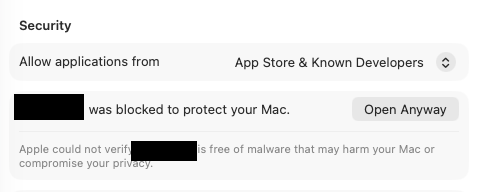
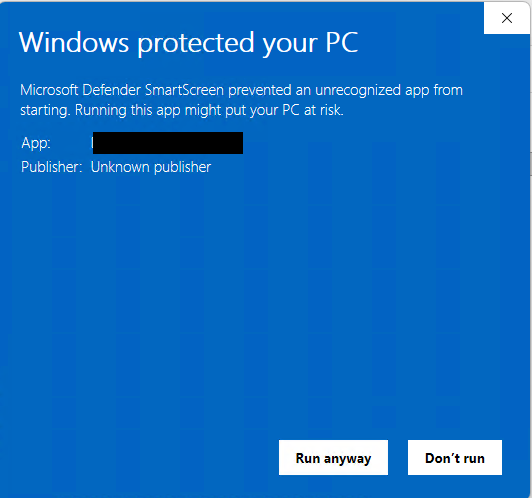
If you have to click "Open Anyway" to install it, the app is unsigned, and you are switching off your operating system's protection to run it. When you download an app for macOS or Windows, the system checks that the developer's identity has been verified and, on macOS, that Apple has scanned that exact build for malware. Install instructions that route you through Settings to bypass a warning are asking you to skip both.
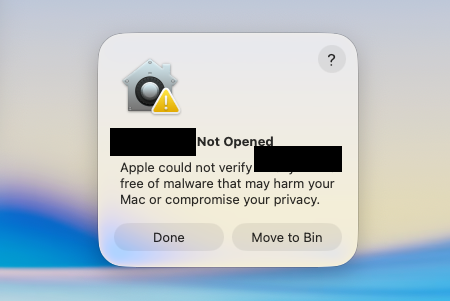
Sometimes that is a reasonable trade. Plenty of legitimate hobby software is unsigned, because signing requires a paid developer account and a verified legal identity. But be clear about what you are accepting: no real-world identity stands behind the build, no malware scan has run on it, and if the download is ever tampered with, on the project's site or anywhere between it and you, nothing will warn you. For a game, you might accept that. For software that sits on your network reading your router, the bar should be higher.
The check takes seconds. Does the app open without a security warning, and does the publisher name the operating system shows match a real company you can look up?
What does it want from your Starlink account?
Live dish telemetry needs no login. Your Starlink account is the keys to your billing. That is the dividing line, and it is the most important check in this guide.
Everything about your dish's performance, latency, throughput, obstruction, power and alignment, is available on your own network, from the dish itself, with no account of any kind. An app that only reads local telemetry never needs to know who you are. This is how Nexus Telemetry works: it reads the dish directly and never asks you to log in.
Your Starlink account is a different thing entirely. Billing, plan details, data allowances and your service address live in Starlink's cloud, behind your login. An app offering those features needs your credentials in some form, a password or a copied session token, and either form amounts to full control of the account: the ability to see your bills, change your plan, and spend your money.
One reassurance deserves care when you meet it: an app saying it never sees your password. That can be true and still miss the point. A session token is the password for every practical purpose, and in some ways a riskier one: replaying it is not challenged by two-factor authentication, you cannot see or manage it the way you manage a password, and anything on your machine that can read it can use it. Where it is stored matters just as much. On macOS, the keychain's strongest protection binds a stored item to the app's verified code signature, so an unsigned app that keeps your token in the keychain is leaning on a protection its missing signature has already weakened. That is why the first two checks compound: unsigned and holding credentials is the combination to walk away from.
Before granting that, get plain answers to three questions.
What exactly does it take? A password, or a session token you paste in?
Where is it stored and how is it protected? A good answer names the place, the system keychain rather than a file on disk. "Securely" is not an answer.
How do you revoke it? Is signing out of the app enough, or does a copied token keep working until you change your Starlink password?
If the answers are vague, use the local features and decline the cloud ones. A well-built app makes that separation obvious.
How do fixes reach you?
A maintained app tells you a fix exists and delivers a signed update in a click. An unmaintained one relies on you noticing a problem and manually downloading a new file, which in practice means most users never update at all.
This matters more the more the app can touch. Software that holds an account credential but has no way to ship you a security fix is a liability that grows with time. And free projects, however sincere, run on the author's spare evenings: features get promised against sponsorship, platforms wait for donations, and a repository can go quiet the month its creator changes jobs. That is not a criticism. It is simply what free means, and you should price it in. Look for a release history with dates, a way to report a fault, and any commitment, however informal, about how long the project will be looked after.
What does it do without asking?
Check two habits on first run: does the app add itself to your startup items without asking, and does it scan your network beyond the device it claims to read?
There are honest reasons for both. A monitoring tool genuinely needs to run in the background to keep history. But the honest version asks, or at the very least tells you clearly and makes opting out one click. An app that quietly makes itself permanent has made a decision that was yours to make.
Does the paperwork hold together?
Look for three things: a licence that only covers what the author actually owns, a named person or company behind the project, and a privacy statement, even if it just says nothing is collected.
This check sounds like pedantry and is anything but. A project that bundles another company's logos, product imagery or interface design under an open-source licence is granting rights its author does not own. That tells you nothing was checked, and it creates a practical risk: a single trademark complaint can remove the app from stores and repositories overnight, taking its update channel with it. And if nobody behind the project is identifiable, nobody is accountable, which is fine only if you knowingly accept it.
Who are these free apps actually for?
If you are technical, they are for you. Open code can be audited by anyone, which is a form of trust no closed app can offer, and a local-only open-source tool that never phones home is, in one important dimension, as private as software gets. This space owes a real debt to the open work that first mapped the dish's local interface, and the best of the new projects deserve the same community around them. If you can read a repository, judge a credential flow and build from source, the checks above take you minutes, and the good projects are well worth getting involved with. Contribution is what turns a promising weekend app into a curated one.
If you are not technical, be honest with yourself about that. The checks still work, none of them need code, but they are curation work, and with a free app that work is yours for as long as you run it: watching for updates, judging each new permission, noticing when the repository goes quiet. If you would rather not take that job on, what you want is software where someone else is accountable: signed and notarised, updated automatically, supported when it breaks, from a named company you can hold to it. That is the job a paid app exists to do, and that reader is exactly who we built Nexus Telemetry for.
The short version
Check who signed it, and what you are switching off if nobody did. Draw a hard line between local telemetry, which needs no login, and your Starlink account, which is the keys to your billing; a session token is that password in different clothes. Ask how a security fix would reach you. Watch what it does on first run without asking. Read the paperwork, because a project careless with other people's trademarks has told you how carefully the rest was checked. Software is cheap and quick to produce now, and the curation that once came built in is yours to do: these five checks are that curation, and they judge behaviour, not how the code was written. If you are comfortable doing that work, the good free apps are worth using and worth joining. If you would rather someone else carried it, that is what Nexus Telemetry is for.
Part of Starlink Monitoring: The Complete Guide. Nexus Telemetry is built by Liquidbinary Ltd, the team behind one of the first Starlink Enterprise management platforms.