Starlink Removed Dish GPS. Here's How to Get It Back.
On 20 May 2026, Starlink stopped exposing your dish's GPS location over the local API. If your setup suddenly can't read your position, whether that's a monitoring tool, an RV or marine dashboard, or a Home Assistant integration, this is why, and here's what to do about it.
The change was deliberate. Starlink emailed customers in April 2026 to say dish location would no longer be available via the local device gRPC API from 20 May. It was later partially reversed for customers on Priority service plans, though that came through targeted customer emails and user confirmation rather than a formal public announcement, so for most affected users the capability is still gone. The good news is the problem is solvable, and depending on your situation it may already be solved for you.
What changed
Until May 2026, every Starlink dish would report its precise latitude, longitude, and altitude over your local network, through the same gRPC interface that monitoring tools use to read everything else. You had to enable it once (it lived under Debug Data in the app), but once on, any device on your network could read the dish's exact position, and that position updated automatically as you moved. For a fixed home install that's a convenience. For anything mobile, it was the whole point.
Starlink hasn't given an official reason. Two explanations are doing the rounds, and both are plausible. One is security and privacy: the feature let any device on your network, including a guest's, silently read precise GPS coordinates, often bypassing the location-permission prompts that phones and laptops normally enforce. The other is commercial: SpaceX has pitched Starlink positioning as a paid service, and ending free local access would clear the way for that. Either way, for most plans the local-API location is gone, and the in-app location and the enterprise Telemetry API (which only returns approximate grid cells, not precise coordinates) don't replace it for most uses.
We covered the technical detail of the change and our analysis of it on our engineering blog.
Starlink is removing GPS from the local API: what it means →
What about the Priority-plan restoration?
After the cutoff, Starlink restored local GPS access for Priority service plans. This came through targeted customer emails and was confirmed by users and resellers rather than announced as formal public policy, but it appears settled: Residential, Roam, and the other consumer tiers remain without it. So whether you still have local GPS now comes down to which plan you're on.
For most of the people the change actually hurt, upgrading to Priority is rarely the sensible fix. The users who most need local GPS are Mini owners on RVs and boats, and by definition those are on Roam or Residential plans, not Priority. The price gap between those plans and Priority is large rather than incremental, and a one-off USB GPS receiver typically costs less than a single month of the upgrade difference, while avoiding any usage-based data charges entirely. For a fixed home install, you don't need live GPS at all (see below). So for the overwhelming majority of affected users, an alternative GPS source is both cheaper and simpler than changing plan.
Who this actually affects
If your Starlink sits permanently at a fixed address, you may not care. Your location never changes, so you can set it once and move on. The people genuinely affected are the mobile users:
RVs, vans, and overlanders. The dish moved with you and your dashboard followed. Now it won't.
Boats and maritime. Same problem, higher stakes. The maritime world had a particular use for it, because the dish's reported position was resistant to local GPS jamming and spoofing, which made it a useful backup where conventional GPS was being interfered with. Losing the automatic local feed is a real operational change.
Home Assistant and self-built dashboards. Any integration that polled the dish for coordinates to drive automations or maps will now get nothing back.
Fleet and reseller operations. Anyone managing dishes across sites loses per-site location automation and has to source position another way.
How to get location back
There are three practical routes, depending on how mobile you are.
If your dish doesn't move: set a fixed location
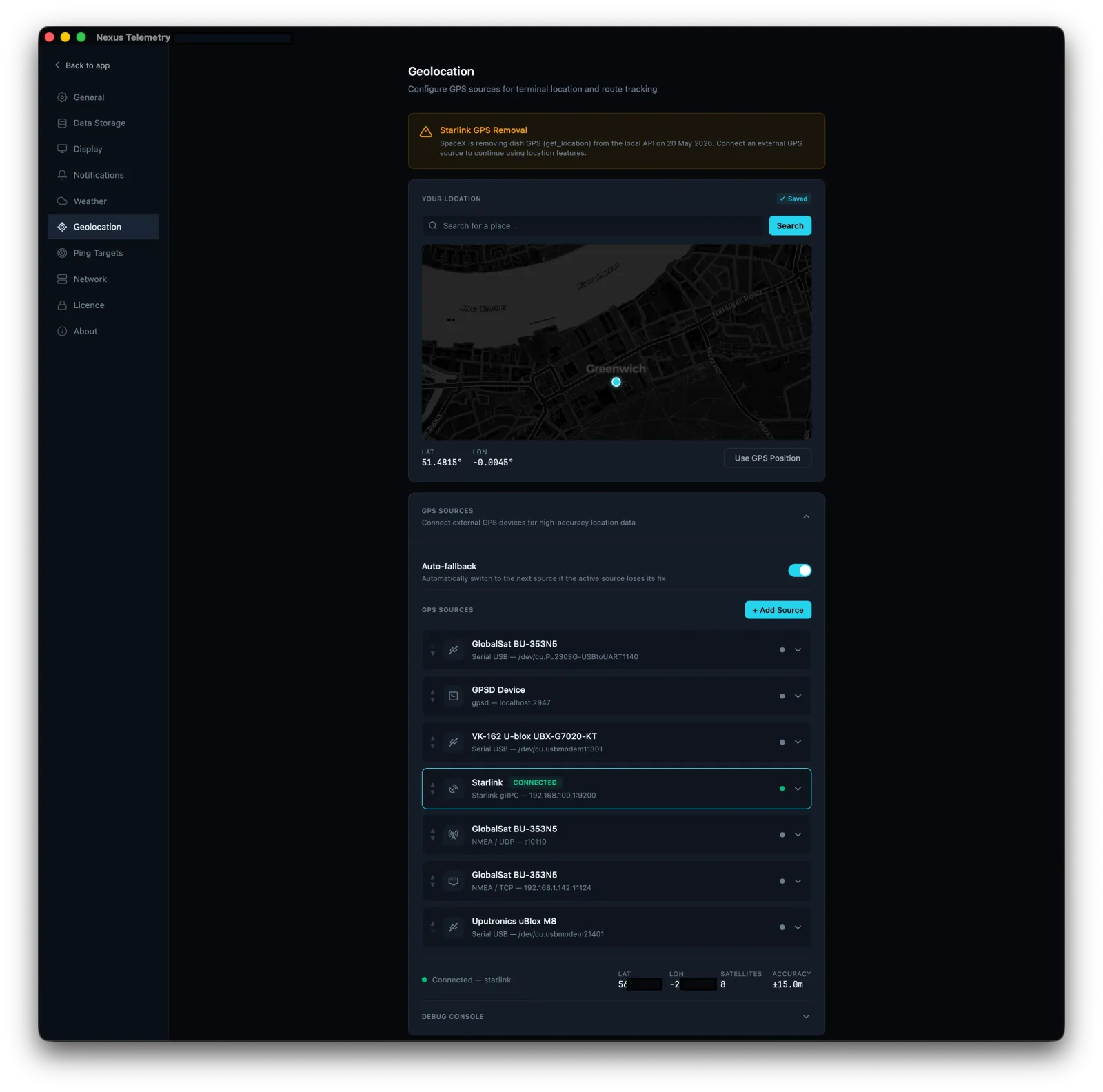
The simplest fix. If your install is permanent, you don't need live GPS at all, you need your coordinates entered once. Any decent monitoring tool lets you set a manual latitude and longitude, and everything that depended on location (mapping, weather, satellite geometry) works from that. Nexus Telemetry supports manual coordinates exactly for this case: search an address, click a point on a map, or type coordinates directly.
If your dish moves: add a GPS source
For mobile setups, you need a real GPS feed to replace the one the dish stopped giving you. The common options:
A USB GPS receiver plugged into the machine running your monitoring software is the cheapest and most reliable route. Inexpensive, widely available, and accurate. This is what most affected RV and marine users are switching to.
A network GPS source over NMEA. Many vessels and vehicles already have a GPS unit broadcasting position on the local network, which monitoring software can read directly over TCP or UDP.
gpsd, if you already run it, common on Linux and marine setups that aggregate multiple GNSS sources.
We tested several USB receivers against the old dish feed to see which actually work well for this.
Four GPS receivers vs the Starlink Mini →
Let your monitoring tool handle the fallback
The cleanest answer is software that already anticipated this. Nexus Telemetry uses a multi-source location system: a manual fixed location, a connected USB GPS receiver, a network NMEA source, gpsd, or the dish itself where it still works, with automatic fallback between them. So when the dish feed disappeared, setups using Nexus kept working. We wrote up how we built it if you want the technical detail.
Building multi-source GPS for Nexus Telemetry →
The short version
Unless you're on a Priority plan, the dish won't give you GPS over the local API any more. If you're stationary, set your location once and you're done. If you move, add a cheap USB GPS receiver or feed in an existing NMEA source, and use monitoring software that can take location from those sources instead of the dish. Upgrading to Priority just to restore GPS rarely makes sense for the mobile users it most affects, a receiver is cheaper. If you're already running Nexus Telemetry, the fallback is built in: set your source and carry on.
You can see what your dish is reporting, and set up an alternative location source, with a free trial of Nexus Telemetry.