Is There a Starlink App for Linux?
Nexus Telemetry is an independent desktop app for Starlink on Linux. It reads your dish's live telemetry over your local network. Starlink's own app is for phones and tablets only, so there is no official Linux version.
The phone app isn't your only window into the dish. This page explains what's possible on Linux, the options you've got (from free command-line tools to the native app), and what you actually get from each.
Why isn't there an official Linux app?
Starlink's app is designed for setup and quick checks: point it at the sky during install, run a speed test, see whether you're online. That's a phone job, so SpaceX built it for phones. They've shown no sign of building desktop software, and the basic status page the dish itself used to serve in a browser has largely been retired.
But the dish itself doesn't care what's asking. It exposes a detailed telemetry stream on your local network over gRPC, which Linux users are often already poking at, with more detail than the phone app surfaces in its normal view. Any application on your network can read it, including one running on your Linux box, headless server, or Raspberry Pi.
What you can monitor from Linux
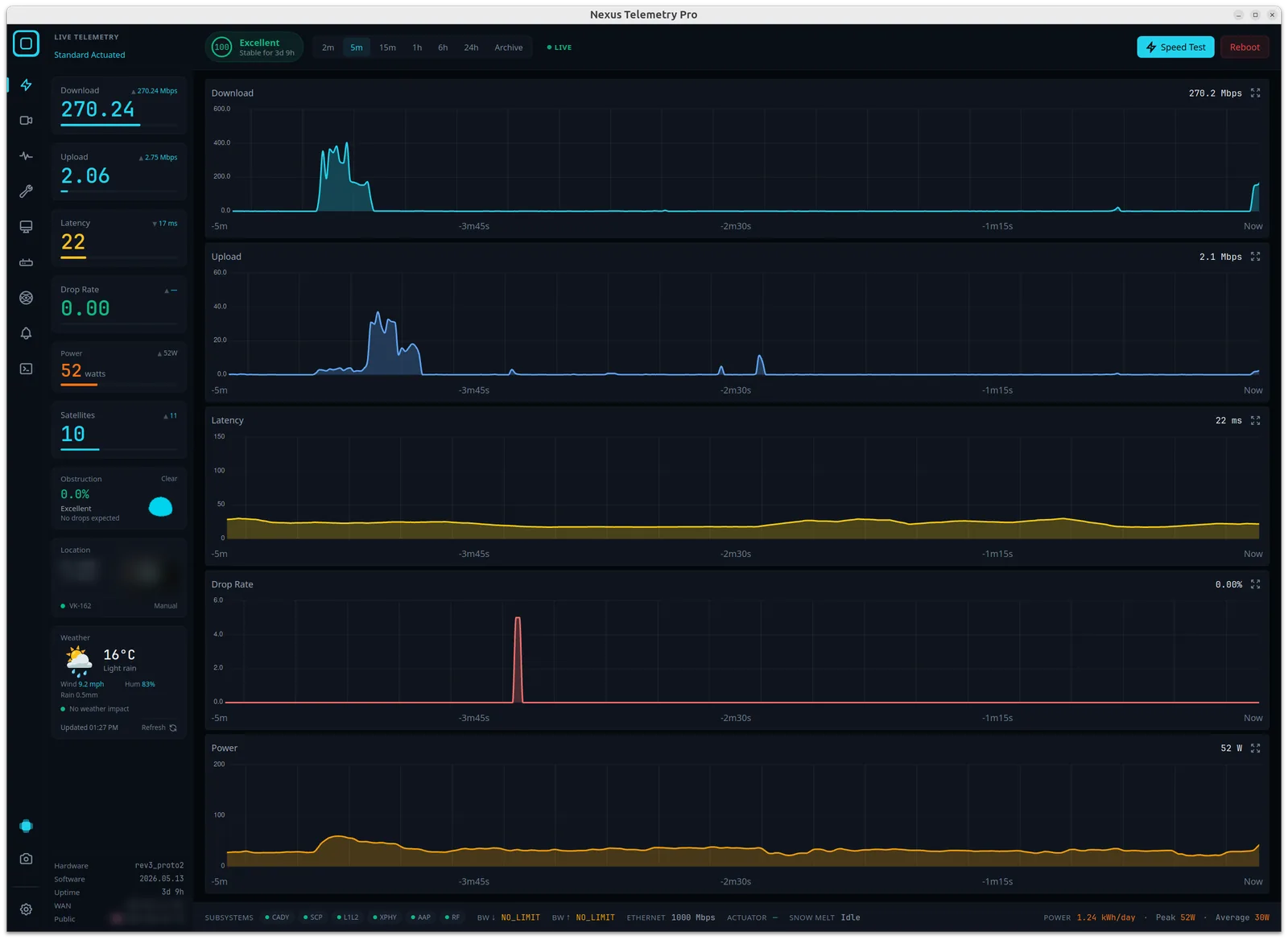
With the right software, your Linux machine can show you everything the dish reports in real time:
- Obstruction: the live percentage and the full sky map, built up over time
- Latency, download, upload, and drop rate: charted continuously, not just a one-off speed test
- Power consumption: real average draw, useful for off-grid and marine setups
- Dish alignment: tilt, azimuth, elevation, and any changes to them
- Connection health and outage history: a recorded log, not a momentary snapshot
- The likely satellite you're connected to: inferred from the dish's pointing direction and live orbital data
None of this requires a Starlink account, a login, or any cloud service. It all happens locally between your machine and the dish. One exception worth knowing: in May 2026 Starlink removed dish GPS from the local API for most service plans, later restoring it for Priority plans only, so location on consumer plans now needs an alternative source. (What the GPS removal means, and how to work around it →)
The options for Linux users
Run command-line tools. Open-source projects like starlink-grpc-tools query the dish's gRPC endpoint directly and are popular in the Linux and Home Assistant world. If you're comfortable assembling your own stack, with gRPC, a time-series database, and a Grafana dashboard, this is a capable free route, but it's a project to build and maintain, not an app.
Use Nexus Telemetry. This is the native option: a proper Linux desktop application that connects to your dish, reads the telemetry, and presents all of the above in real time, with recording, charts, and alerts built in, no dashboard-building required. It was the first cross-platform desktop app built for exactly this, and the same app runs on Mac and Windows too, so a mixed-OS setup sees the same tool everywhere.
Getting started on Linux
- Make sure your machine is on the same network as your Starlink (connected to the Starlink router, or a network that can reach the dish).
- Download Nexus Telemetry for Linux and run it.
- It auto-detects the dish and starts streaming telemetry immediately.
There's a free trial, so you can see your own dish's real data before deciding. If you've ever wondered what the phone app isn't telling you, this is the quickest way to find out.
A note on what the phone app hides
It's worth seeing this in action. A green status in the phone app says nothing about latency that doubles every evening as your cell fills up, or brief drops that cluster at the same time each day. Desktop monitoring records all of it over time, so a vague "the internet felt slow last night" becomes a chart you can actually read. That's the difference between a status light and actual monitoring: not drama, just visibility into what your dish is really doing.