Why Your Starlink Dish Repositions Itself
Some Starlink dishes physically re-aim themselves, sometimes dramatically, with no warning in the official app. If you've noticed your dish pointing somewhere new, this is a documented behaviour, it only happens on motorised (actuated) dishes, it usually has no effect on performance, and a reboot normally puts it back. This guide explains what's going on and what to do.
The short version up front: it's rare, it's usually harmless, and it's fixable in under two minutes. Worth understanding rather than worrying about.
What actually happens
Actuated Starlink dishes have motors that aim them. Occasionally one of these dishes will drive itself to a completely different orientation, on its own, without the user doing anything. Fixed, non-actuated dishes can't do this at all; they have no motors to move themselves.
The exact trigger isn't officially documented. Some repositioning seems to coincide with a firmware update, and SpaceX also appears to repoint dishes from the network side for coverage and load balancing, so a move can be either. Starlink hasn't published an explanation either way, so this is community-observed behaviour rather than something with an official cause attached.
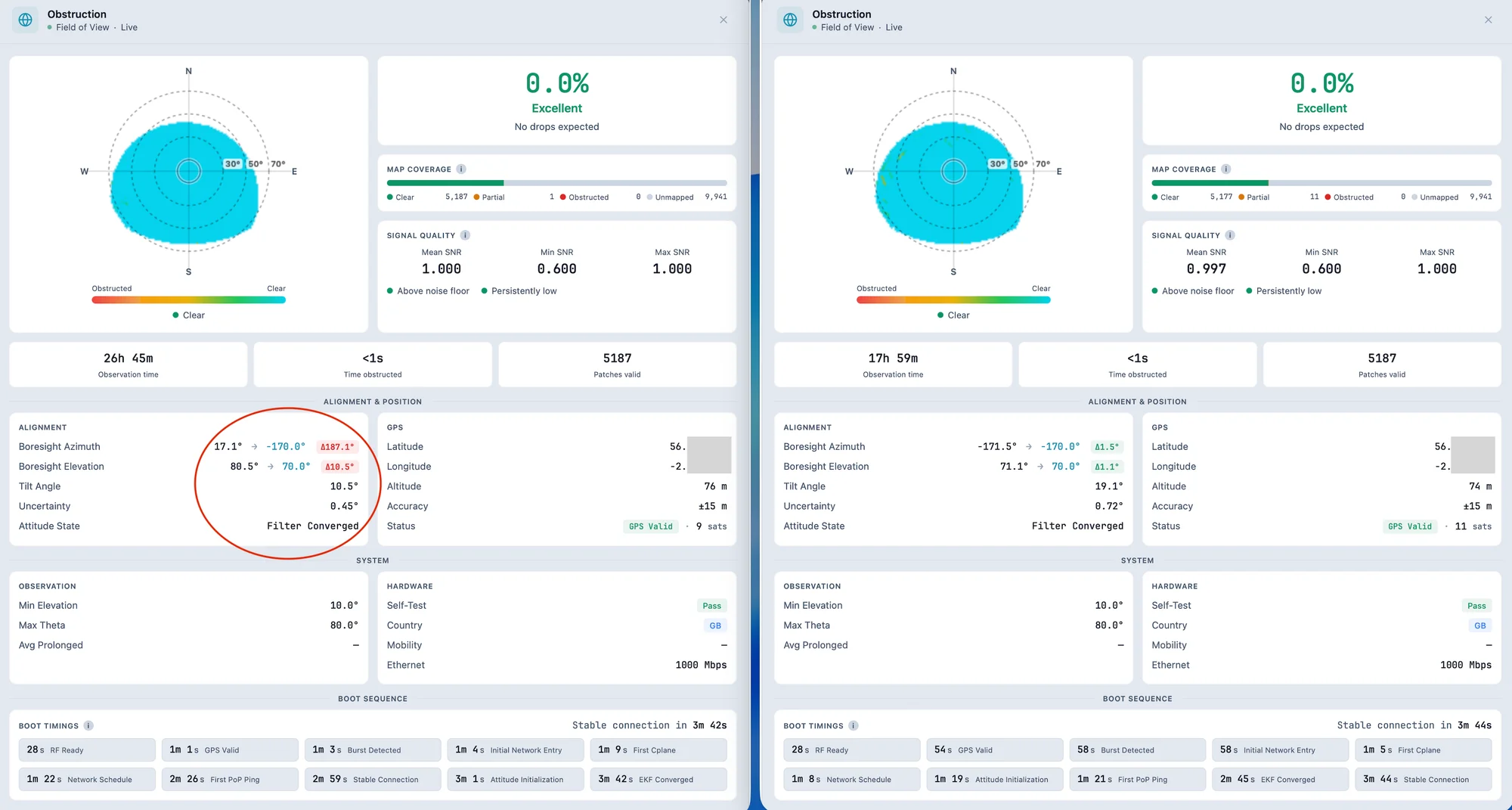
We've seen it first-hand. One of our own dishes, in the same position for over three years, spun nearly 190° and lay almost flat. Our telemetry flagged the boresight azimuth as roughly 187° off its desired heading, yet the dish reported its actuators idle and its attitude filter converged, as though it considered itself correctly settled, even while pointing nearly the opposite way from its long-standing position. The official app showed nothing wrong throughout.
Why it usually doesn't matter
The surprising part is that performance often carries on completely unaffected. In our case latency stayed normal, there were no extra drops, obstruction stayed at zero, and signal quality was excellent, all while the dish was pointing the "wrong" way.
That's because Starlink is a phased array. It steers its beam electronically and tracks satellites across a wide field of view, so the exact physical orientation of the dish matters less than you'd intuitively expect, as long as it still has clear sky. The dish simply re-acquired satellites in its new position and got on with it. So a repositioned dish is not automatically a broken dish.
The fix: reboot
If the new position bothers you, or if you do see a performance change, reboot the dish. On reboot it performs a sky search, re-evaluates its pointing, and normally snaps back to its intended orientation. In our case the dish returned to within a degree or so of its original three-year position, and total downtime was well under two minutes.
That's genuinely the whole fix. No support call, no remount.
When to actually pay attention
Most repositioning is harmless, but the alignment figures are worth a look if your performance changes for no obvious reason, because a move into a spot with obstruction (rather than open sky) could cause real drops. The distinction is: a dish that repositioned but still has clear sky and good numbers is fine; a dish that repositioned into an obstructed view is worth correcting. Watching obstruction alongside alignment tells you which you've got.
How monitoring helps
The official app would show a green status throughout an event like this and never mention that your dish had rotated. The only reason we caught ours was continuous telemetry recording the alignment over time. Desktop monitoring logs the dish's orientation and flags when it changes, so you actually know a reposition happened and when, instead of finding out by accident. Nexus Telemetry records alignment over time for exactly this.
How to monitor your Starlink →
For the full technical write-up of the event we caught, including the firmware details and the boot sequence that corrected it, see our engineering blog.
How Nexus Telemetry caught a silent dish repositioning →
The short version
Actuated Starlink dishes can re-aim themselves, occasionally by a lot, sometimes around a firmware update and sometimes as network-side repointing. It doesn't happen to fixed dishes, it usually has no effect on performance because the dish is a phased array that re-acquires satellites in its new position, and a reboot normally returns it to where it belongs. Only worry if performance actually changes, which usually means it moved into an obstructed view. Continuous monitoring is how you know it happened at all.
See your dish's alignment and catch changes as they happen with a free trial of Nexus Telemetry.